voltage: force responsible for movement of electrons(electric current) through a electric circuit
current:amount of electrons flowing at a point per second
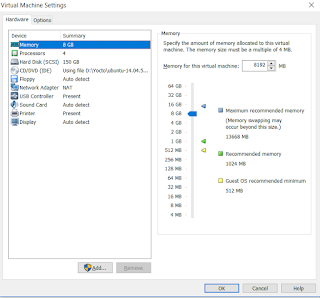
This post is to establish the serial communication between two Virtual Machines running Ubuntu in VMWare. Serial Ports are very important and with this setup, we can write applications and don't worry to have a hardware. This setup is also used if we need to setup KGDB Steps on the First Virtual Machine: Step1: Open Virtual Machine Settings and click on Add Step2: Select "Serial Port" and Click On Next Step3: Select "Use Named Pipe" Step4: You will observe the named pipe of the form \\.\pipe\<namedpipe>. Keep the settings as it is i..e, the named pipe: \\.\pipe\com_1 ( it will be ttyS1 in Linux) and click on Finish Steps on the Second Virtual Machine: Perform the same steps 1 to 4 except in 4th step select "This end is Client". Testing the serial connection between VMs: 1. Power on the two VMs 2. On First VM : cat /dev/ttyS1 and the other VM: echo "hello" > /dev/ttyS1
bb.utils.contains is most commonly used function in Yocto. grep in poky directory returned with 696 count. $ grep -nr 'bb.utils.contains' poky/ | wc -l 696 It's definition is present in 'poky/bitbake/lib/bb/utils.py' file This function returns third argument if the second argument is subset of the first argument else returns fourth argument Let's take an example to understand this. You can see from the above screenshot, when the second argument is a subset of first argument, "present" was returned, else "notpresent" was returned We can also use bb.utils.contains inside if loop. This we can use inside a recipe. if ${@bb.utils.contains('SOMEFLAG','NEWVALUE3','true','false',d)}; then FOO = 'HELLO' fi
dumpbin is a program in Visual Studio Tools that helps you to display information in binary fi le. By using dumpbin we can check whether a dll is build for x86 or x64. In order to run it Go to Start -> Microsoft Visual Studio2008 -> Visual Studio Tools -> Visual Studio 2008 Command Prompt. Type dumpbin and it will list all the commands present. To see all the methods exported by a particular DLL, change the directory where the DLL is present and type the following command: dumpbin /exports TestStreamDrv.dll To check whether a dll is build for x86 or x64 and type the following command: dumpbin /headers TestStreamDrv.dll It displays a lot of information. Look for Machine which is present in FILE HEADER VALUES . This determines whether the DLL is present for x86 or x64. References: http://thompsonng.blogspot.com/2011/03/dumpbin-checking-your-application.html

Comments
Post a Comment