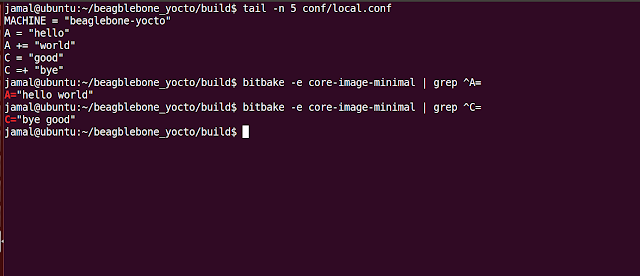
Bitbake provides two sets of appending and prepending operators. 1. +=, =+ 2. .= , =. For example, A = "hello" A += "world" C = "good" C =+ "bye" The value of A will be "hello world" and C will be "bye good" So, += is appending and =+ is for prepending. Note, that these operators include an additional space between each call When we don't need to add space, we can use .=, =. operators. These are mainly used to concatenate strings. When we use append, prepend, there will be no additional space added, you need to manually provide space. You can also remove values from the variable using 'remove'.
ARM INTERVIEW QUESTIONS 1. What is T,D,M,I in ARM TDMI? 2. What are the different modes of ARM 3. What are the different states in ARM 4. Significance of each state and mode? 5. Draw CPSR for ARM7TDMI 6. There is no separate return statement in ARM . then what we will use to return from ARM? 7. How does stack grows in ARM? 8. What is the instruction to switch from ARM to Thumb and vice versa? 9. What are the different coprocessors in ARM? 10. C Runtime Environment,Linker Descriptor File 11. Differences between Memory mapped I/O and I/O mapped I/O? 12. Vector locations in ARM? 13. Why FIQ is faster than IRQ?
Per CPU Variables is an interesting feature available from Linux Kernel Version 2.6 When you define a Per CPU Variable, each processor in the system will have its own copy of the variable, hence no locking is required and better performance is achieved. Header File: <linux/percpu.h> To create a Per CPU Variable at compile time, use the macro: DEFINE_PER_CPU(type, name); E.g. DEFINE_PER_CPU(int, counter); As linux kernel is preemptible, you must use get_cpu_var macro to access the current processor's copy of a given variable And finally call put_cpu_var macro after you have completed using it. You can access another processor's copy of the variable with: per_cpu(variable, int cpu_id); Example: Output:

Comments
Post a Comment