Serial Port Programming Part11 - stty tutorial
stty is used to


- display the current terminal settings
- Modify the terminal settings
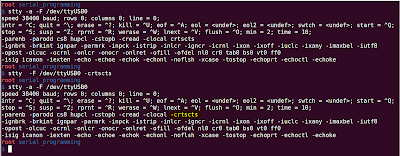
Display all settings: stty -a
The above command displays settings of tty device attached to your shell
If you want to find out the settings of another device file, specify the device file name using '-F' option
stty -F -a /dev/ttyUSB0

Set/Clear a particular setting:
To clear a particular setting, add a '-' in front of the setting.
For example, to disable hardware flow control, you need to run
stty -F /dev/ttyUSB0 -crtscts
To enable the setting, dont add '-' in front of the setting
stty -F /dev/ttyUSB0 crtscts

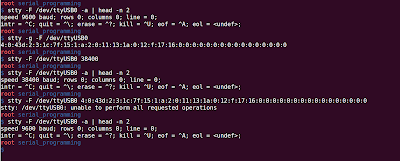
Changing the baud rate:
stty -F /dev/ttyUSB0 <new baud rate>

Store/Restore Settings:
stty allows you to save settings for you to restore later.
'stty -g' command will display settings in a format which you can use pass later to stty


Comments
Post a Comment