Posts

Showing posts with the label Command

Linux chage command - Change Age
Image
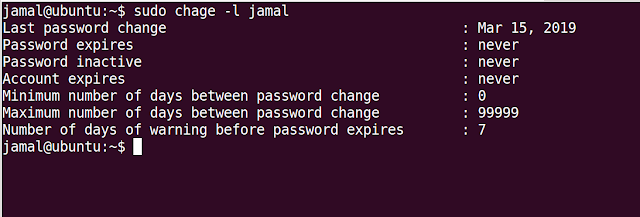
chage stands for 'change age'. This command is used to change user password expiry information. Syntax: chage [options] LOGIN Examples: 1. List the password aging information of a particular user: $chage -l <username> From the above output, you can observe that the password expiration is disabled for this user. 2.  Change password expiry date: Use -M option to change the password expiry date, it accepts the number of days after which password will expire. You can use -m option which is the minimum number of days between password change. A value of zero means the user can change the password at any date. 3. Change last password change date: Use the -d option to change the last password change date. You can pass a number to this option or complete date 4. Disable Password aging for a particular user: chage -I -1 -m 0 -M 99999 -E -1 <username> -I --> Inactive -m --> Minimum number of days -M -->...

Setting Default permissions of files and directories in linux

Image
Each file on the system has a set of permissions that determine which users can access the files and what type of access they have. When you create a file/directory in Linux, it gets the default permissions set by the system administrator. For example, when I created a file in Linux, I got permissions: '0664' When creating a directory, the permissions in my system are: '0775' File creation mask determines default permissions. If no mask were used the permissions would be: 666 for files 777 for directories File creation mask is set by system administrators. To set this mask or know the current mask, 'umask' command is used. Running 'umask' without any arguments will show the current mask. To set filemask: 'umask <octal value of permissions> or 'umask -S <symbolic notation>' The permissions of file will be : Base Permission (0666) - umask value(0002) in my case = (0664) The permissions of directory ...

Examples of Ping Command

Ping command is used to check the network status between two nodes. Developed by : Mike Muss Abbreviation : Packet INternet Grouper How it Works : Ping works by sending an ICMP Echo Request(Type 8) packet to the other node specifying that Iam Alive and asking about his status,if the other node receives the packet he will reply with an ICMP Echo Reply(Type 0) packet telling the node he is also Alive. With this ICMP messages Ping gives us the time that takes to reach and get back the reply from a node(round trip time). Syntax : ping <ip_address> Example : ping 192.168.1.5 We will see different examples in which we can use ping 1.Setting the Interval:              By default ping sends an Echo Request for every one second. If you want to change the interval you can do it by specifying with 'i' option. If you want to have anything beyond 200 ms you have to be in root permissions      ...