Display format/color text on the shell
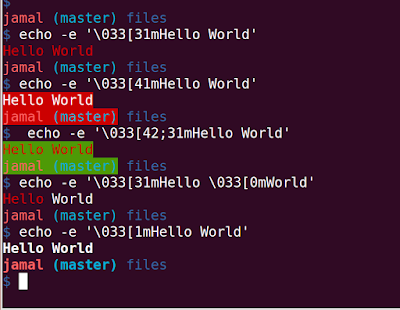
Terminals can display texts in color as well as allow formatting with the help of escape sequences. Escape Sequence = Escape Character + FormatCode+'m' = "<esc>[FormatCodem" Escape character can be '\e', \033, \x1B The format code for Red is 31, so to print the Text in Red. echo -e '\033[31mHello World' The -e option of the echo command enable the parsing of the escape sequences. If you want the background to be Red the format code is 41. echo -e '\033[41mHello World' We can add multiple format codes with a ; as delimeter echo -e '\033[42;31mHello World' To remove all formatting, the format code is 0. echo -e '\033[31mHello \033[0mWorld' It is better to add \033[0m at the end of each colored text. To Bold the text, the format code is 1. echo -e '\033[1mHello World' You can find more format codes in the below link: https://misc.flogisoft.com/...