Posts

Linux Device Driver to disable/enable keyboard

Image
Theory: As we have seen in our earlier posts, that there are three registers for keyboard controller. Control Register (0x64) -- Write Operation Data Register (0x60) -- Write/Read Operation Status Register (0x60) -- Read Operation Process to disable Keyboard: Wait until the keyboard controller is not busy by reading the status register Send the command 0xAD to Control Register Process to Enable Keyboard: Wait until the keyboard controller is not busy by reading the status register Send the command 0xAE to Control Register. Code: Output: Notes: We have loaded the module using the command "sleep 1 && insmod ./kbd_disable.ko". If you try only "insmod ./kbd_disable.ko", the keyboard will disable at "Enter Press", so the console will be continuously receiving Enter Press Keys, until keyboard gets enabled back
checkpatch.pl - Coding Style, Spell Check

Image
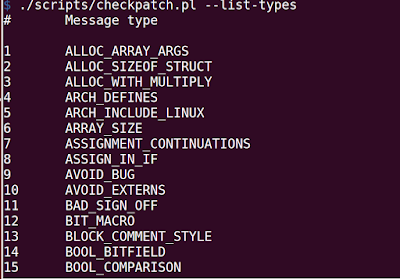
checkpatch.pl is perl script present in scripts folder of the Linux Source code. It is used by the developers to verify the patches follows Linux Coding Style or not before upstreaming them. E.g. $ ./scripts/checkpatch.pl <patchfile.patch> To see what all options are supported by checkpatch, run "checkpatch.pl --help" How to use checkpatch.pl to verify coding style of our own C Source files? $ ./checkpatch.pl --no-tree --file mychardriver.c --no-tree option allows to run without a kernel tree --file option tells checkpatch to treat this as a file instead of patch. To list all the various messages it supports, run $ ./checkpatch.pl --list-types You can look more info about each message in checkpatch.pl file You can use checkpatch.pl to check for spellings and typos, for that you need to have codespell package installed, if you dont' have install it with the following command: sudo apt-get install codespell And enable codespell param...

Access Control on Device Files - Allow only one process to open at a time

Image
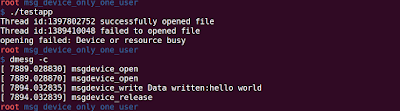
Let's modify our /dev/kmsg driver to avoid multiple processes opening the device simultaneously to avoid any concurrency issue. We will use atomic variables as a solution. You can learn more about atomic variables in my previous post. Logic: Initialize the atomic value with 1 In open function, decrement and check whether the value is zero, if zero then return success If the value is not zero, then increment the value and return EBUSY In release function, increment the value of atomic variable. Code: Sample Test Application: Output: Notes: You can see while one thread was using the device and when the other thread tried to access it failed. Also, from dmesg output, open was called twice and release only once

Creating jiffie character device - /dev/jiffies

Image
What is jiffies? Informally, According to wikipedia, jiffy is term used for any unspecified short period of time. Coming back to our Linux Kernel World, jiffies is a global variable which stores the number of clock ticks since boot. It is present in <linux/jiffies.h> Let's write a character driver which on read returns the value of 'jiffies'. Code: Test Application: Output: Notes: 1. You can see from the output, the difference we got is 250, it means the value of jiffie increments by 250 every second, this also means the timer is configured to generate 250 interrupts every second. 2. We use put_user to copy the value of jiffies to user space. put_user is faster than copy_to_user, and can copy up to 8 bytes of data. The size that put_user copies depends on the type of the pointer argument and is determined at compiled time using typeof and sizeof builtins.

Atomic variables in Linux

Image
Consider the following program below, try to guess why the output is not 1,00,000 Code: Output: The reason behind it is giving different values each time is SMP Machine. In a multi processor system, global++ will be converted to global = global + 1. Steps to increment the value of global by 1: 1. Processor reads the value of global 2. Processor increments the value in memory 3. Processor writes the new value to global Let's take the example of global value is 5, and there are two processors in system , Processor 1 and Processor 2. Processor 1 reads the value of global and it is 5. Processor 1 increments the value in memory and make it 6 Processor 2 acquires the bus and reads the value of global and it will be 5 Processor 2 increments the value in memory and make it 6 Processor 1 comes and then writes 6 to global variable Processor 2 comes and then writes 6 to global variable. How to solve this problem? The simultaneous access problem...

How many times open and release function is called of a character driver after fork

Image
Consider the /dev/msg which we created in our previous post , what if the test application created fork(), let's see how many times the open and close function will be called. Test Application Code: Output: Notes: The open and release function is only called once. When you do fork(), it will not create a new file structure and close() will call the release method of the driver only when the counter of the file structure becomes zero.

Creating message character device - /dev/msg

In this post, let's create a simple character device - /dev/msg, which will store a user message. Theory We use copy_to_user and copy_from_user to copy data to/fro in between user space and kernel space. unsigned long copy_to_user ( void __user *  to, const void *  from, unsigned long  n); -- Copies data from kernel space to user space. unsigned long copy_from_user (void *to, const void __user *from,unsigned long n); -- Copies data from user space to kernel space. Both on success returns 0 else returns number of bytes not copied. Why copy_to_user and copy_from_user is needed instead of memcpy? It verifies that the memory passed is in a region of memory that the process have access to and the address is not pointing to kernel space by using access_ok macro User pages being addressed might not be currently present in memory, if the kernel directly tries to access the pages which are not in memory, it will result in page fault and kernel will panic on...